
Amazon Lightsail pricing is built on one idea: one monthly price covers everything. Compute, storage, networking, and data transfer come bundled together so you’re not piecing together a bill from a dozen line items.
That simplicity is real, but it has limits. Add databases, load balancers, snapshots, and data transfer overages, and the bill grows beyond the plan price.
This guide covers every Lightsail pricing component, including the charges that catch teams off guard, so you can make a confident decision before you deploy.
What Is Amazon Lightsail?
Amazon Lightsail is AWS’s managed virtual private server (VPS) service. It’s the simplest entry point into AWS infrastructure — and one of the most cost-effective options for small workloads. It bundles compute (vCPU), memory (RAM), SSD storage, and a monthly data transfer allowance into flat-rate plans starting at $5 per month.
Lightsail is built for developers, small businesses, and teams running straightforward workloads: WordPress sites, simple web apps, dev/test environments, and small databases. It trades the configurability of Amazon EC2 for a simpler setup and a predictable bill.
It is not a platform-as-a-service like AWS Elastic Beanstalk, which manages application deployment and environment orchestration. Lightsail gives you a virtual server and handles the rest.
2026 State of AI Spend Report
Why Finance Caps What It Can’t See
Learn how finance leaders are managing AI spend, and how they’re approaching FY2027
How Lightsail Pricing Works
Every Lightsail plan includes a fixed allocation of vCPUs, RAM, SSD storage, and monthly data transfer, all at one flat price. You don’t configure and price those resources separately, as you do with EC2.
Billing is hourly, capped at the monthly plan cost. Run a $12/month instance for 15 days and delete it, and you pay for 360 hours, not the full month.
One important note: stopped instances still accrue charges. Lightsail bills for the resource reservation even if the instance is not running. To stop paying for an instance, you need to delete it.
Lightsail instance pricing: Linux/Unix plans
These are the general-purpose Linux/Unix instance plans with a public IPv4 address, the most common starting point for new deployments.
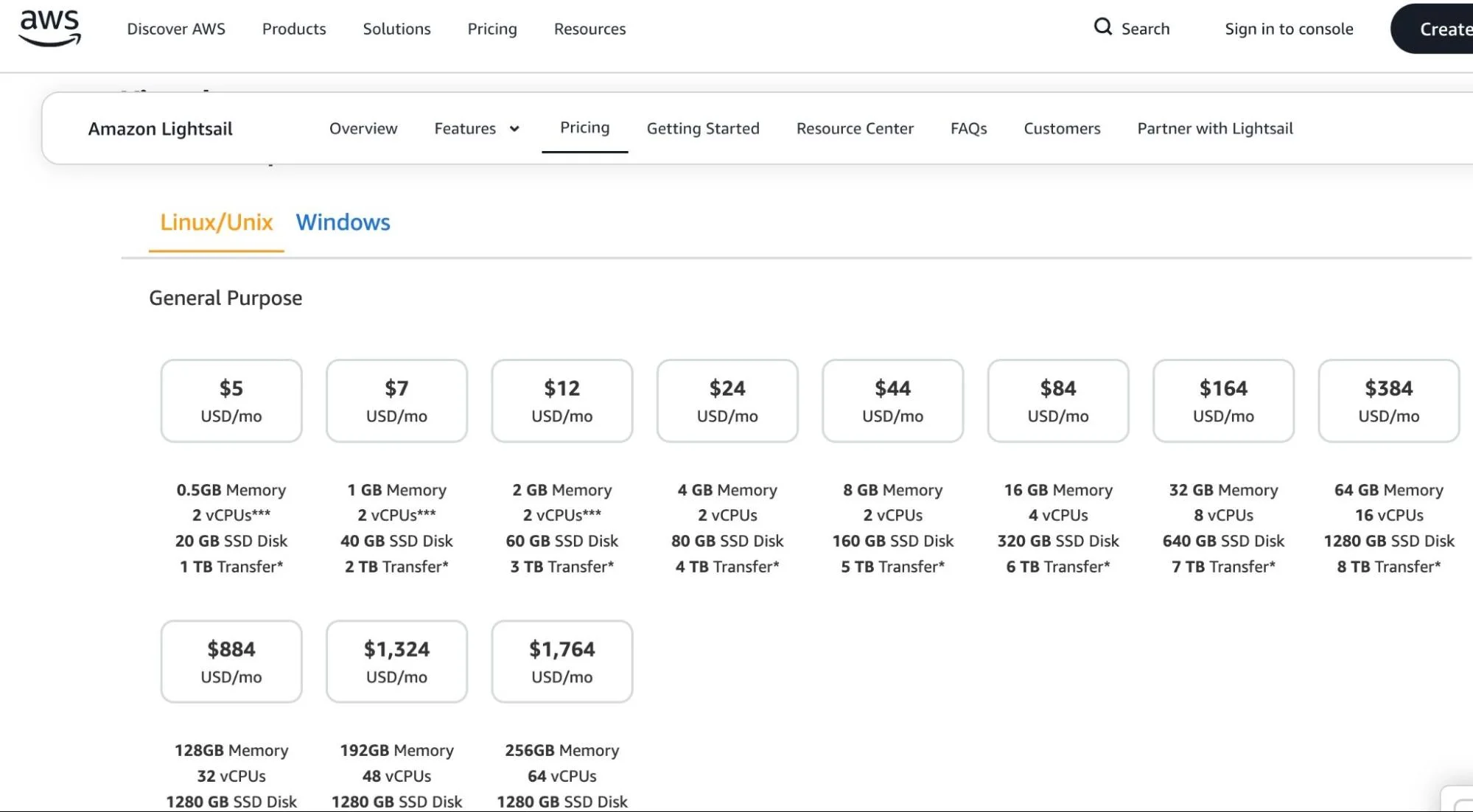
Note: Both inbound and outbound data transfer count toward the monthly allowance. Only outbound overages are billed.
Most use cases land between $5 and $44/month. At plans above $164/month, EC2 with Reserved Instances or Savings Plans typically delivers better cost efficiency.
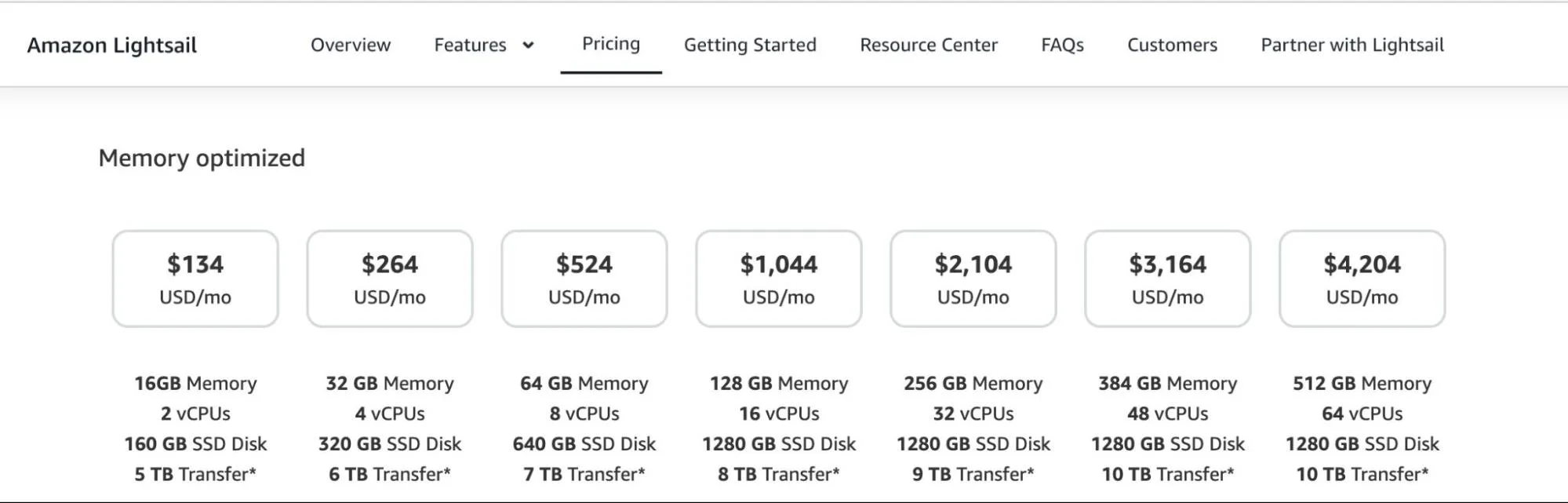
Memory-optimized plans
Lightsail offers memory-optimized plans for workloads like in-memory caching and high-throughput databases. Plans scale from $74/month up to $2,344/month.
Windows plans
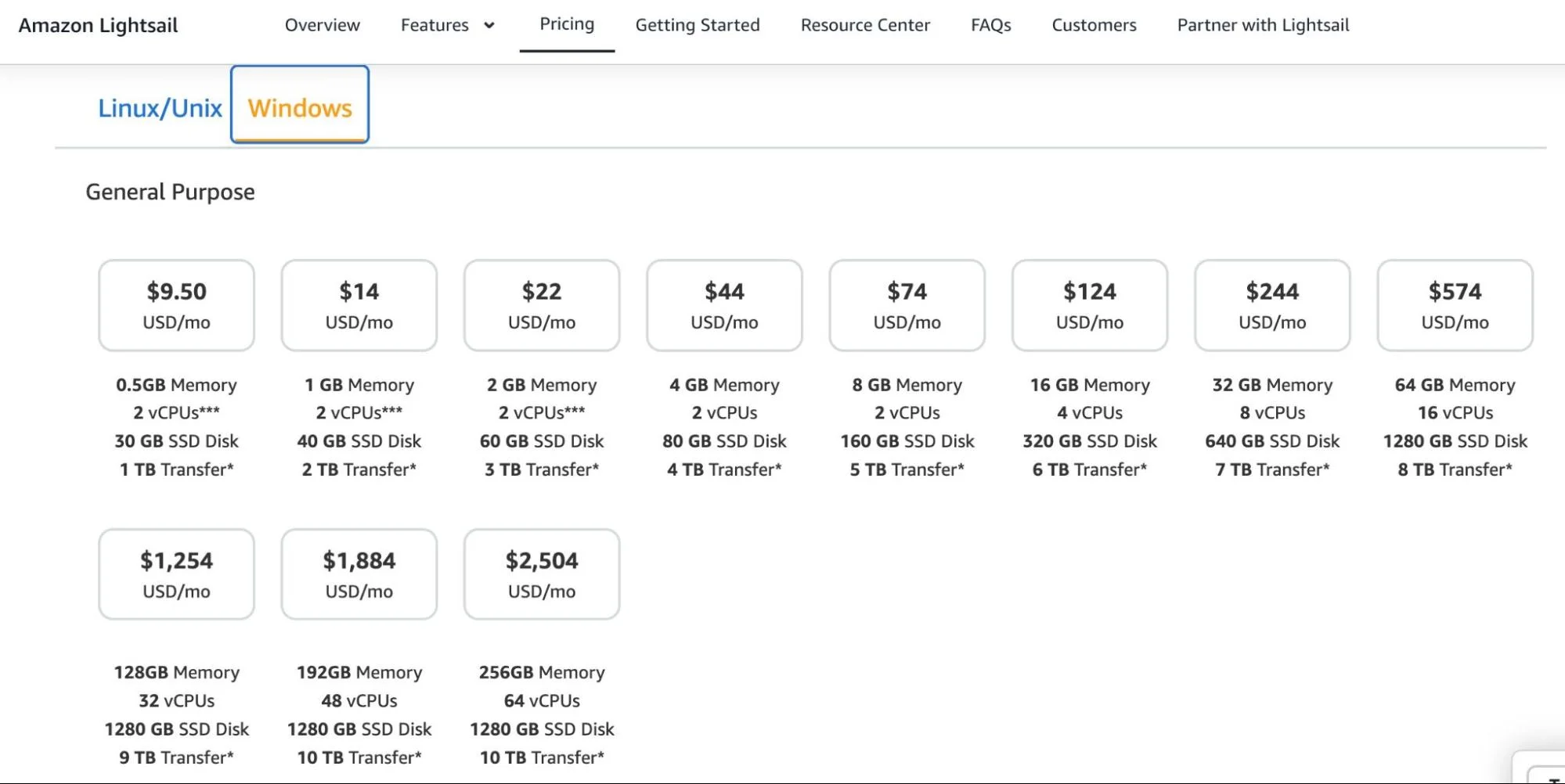
Windows instances carry a licensing premium.
IPv6-only plans
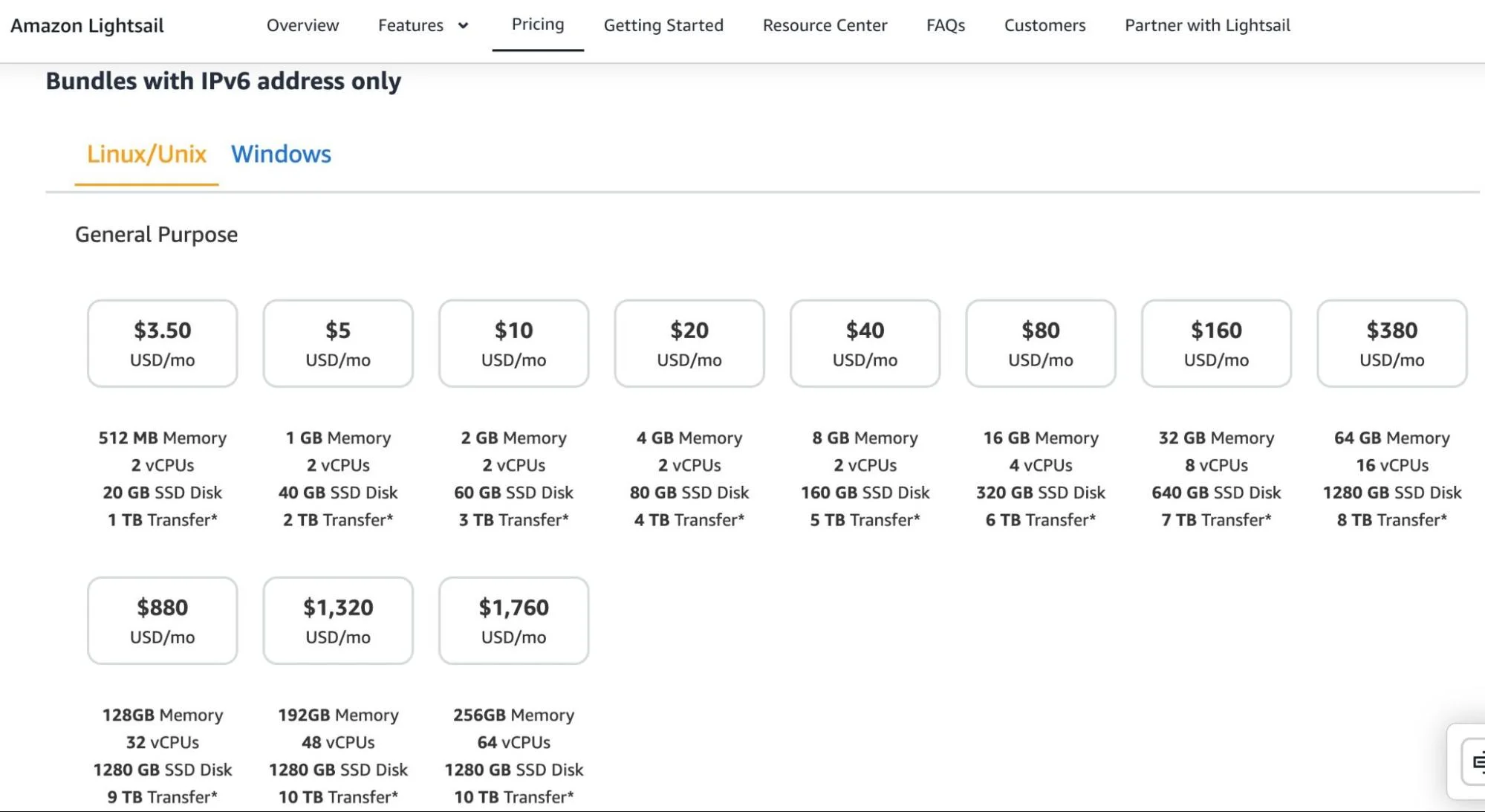
If you don’t need a public IPv4 address, IPv6-only plans start at $3.50/month for Linux/Unix. AWS charges for IPv4 address allocation, so IPv6-only plans are slightly cheaper for workloads that don’t require IPv4 connectivity.
Regional pricing
Plans in the Asia Pacific regions (Mumbai, Sydney, and Jakarta) include half the standard data transfer allowance. A $7/month instance that normally includes 2 TB of transfer includes only 1 TB in those regions. Factor this in if you’re deploying in the Asia Pacific, as overage exposure is double what the plan suggests.
What the Lightsail Free Tier Covers
New AWS accounts receive the following at no charge:
- 3 months free on select instance, database, and container bundles. This includes Linux/Unix IPv4 plans at $5, $7, and $12/month; Linux/Unix IPv6 plans at $3.50, $5, and $10/month; Windows IPv4 plans at $9.50, $14, and $22/month; Windows IPv6 plans at $8, $12, and $20/month; the $15/month database bundle; and the $10/month Micro container service.
- 12 months free for a 50 GB CDN distribution
- 12 months free for a 5 GB object storage bundle
The free tier is useful for prototyping and evaluation. Standard charges apply after the trial periods end, and the offer covers only one bundle per account.
The Full Cost Picture: Lightsail Add-Ons
Instance plans are only part of the bill. Most production deployments add at least a few of the following.
- Managed databases. Lightsail managed databases (MySQL, PostgreSQL) start at $15/month for a 1 GB RAM instance with 40 GB SSD and 100 GB data transfer. High-availability (HA) plans cost twice the standard price because they run a second instance in a separate availability zone for redundancy. New Lightsail customers get one month free on the $15/month plan.
- Container services. Container services start at $7/month for a Nano plan (0.25 shared vCPU, 512 MB RAM, 1 node). The Micro plan (1 GB RAM) is available at $10/month. Each service includes 500 GB of data transfer per month; overages start at $0.09/GB and vary by region.
- Load balancers. Load balancers are a flat $18/month. SSL/TLS certificate management is free when using a Lightsail load balancer.
- Block storage. Additional SSD-backed block storage costs $0.10/GB/month, starting at 8 GB. Unlike EC2’s Elastic Block Store (EBS), there’s no per-IOPS charge. You pay a flat rate for allocated storage regardless of access patterns.
- Snapshots. Manual and automatic snapshots cost $0.05/GB-month. A 40 GB instance disk costs $2/month to snapshot and retain. Lightsail automatically cost-optimizes successive snapshots of the same instance, so you don’t pay full price for incremental changes.
- Static IP addresses. Static IPv4 addresses are free when attached to a running instance. Leave one unattached for more than one hour, and AWS charges $0.005/hr, which works out to about $3.60/month if idle for a full month. Delete unused static IPs.
- Data transfer overages. Each plan includes a monthly transfer allowance. Outbound usage beyond that allowance starts at $0.09/GB, varying by region. Inbound and outbound transfer both count toward the cap, but only outbound overages are billed.
- DNS management. Free up to 3 million queries per month. Beyond that, $0.40 per additional million queries. For most small workloads, DNS costs are negligible.
Lightsail Vs EC2: The Cost Tradeoff
When comparing Lightsail and EC2 pricing, it comes down to two questions: how complex is your workload, and how predictable is your usage?
Where Lightsail wins on cost
For small, stable workloads such as a WordPress site, a dev environment, or a simple internal tool, Lightsail’s bundled pricing beats EC2’s component model. A $7/month Lightsail plan (1 GB RAM, 2 vCPUs, 40 GB SSD, 2 TB transfer) would cost more on EC2 once you add EBS storage, data transfer egress, and an Elastic IP separately.
Where EC2 wins on cost
At scale, EC2’s discount options close the gap fast. EC2 Instance Savings Plans and Standard Reserved Instances offer discounts of up to 72% versus On-Demand pricing. Compute Savings Plans offer up to 66% with greater flexibility.
Actual savings vary by instance family, term, payment option, and region. Lightsail has no equivalent commitment discount program. For workloads running continuously at any meaningful scale, EC2 with a 1- or 3-year commitment will typically cost less.
One thing to keep in mind: teams that start on Lightsail and grow into EC2-level complexity will need to migrate. AWS supports the move from Lightsail to EC2, but it requires deliberate effort. It is not an automatic upgrade path.
Where Lightsail Costs Catch Teams Off Guard
Stopped instances still bill. Unlike EC2 On-Demand instances, which stop accruing compute charges when stopped, Lightsail charges for the reservation even when the instance isn’t running. Delete resources you’re not using.
Asia Pacific data transfer limits are halved. In Mumbai, Sydney, and Jakarta, your effective data transfer allowance is 50% of the plan’s advertised allowance. Overage exposure is double what you might expect.
HA databases cost 2x. The high-availability database option is worth it for production workloads that need redundancy, but the cost is exactly double the standard plan price.
Data transfer overages compound. Applications with high inbound traffic, such as file uploads and backup ingestion, can burn through a monthly allowance faster than expected, since inbound counts toward the cap even though only outbound overages are billed.
Windows licensing adds up at scale. The premium is modest at the entry level ($9.50 vs. $5/month) but significant at higher tiers ($244 vs. $164/month for a 32 GB instance).
Amazon Lightsail Pricing FAQs
How To Understand And Control Lightsail Costs With CloudZero
Lightsail’s flat-rate pricing makes it easy to understand what you’re paying at the plan level. What it doesn’t tell you is why costs are changing, which teams or products are responsible, or whether a given environment is worth keeping. That’s a cloud cost visibility problem, not a Lightsail problem — and it affects every AWS service.
The visibility problem is structural. Lightsail charges are fragmented across multiple AWS billing line items. Your instance plan, managed database, load balancer, block storage, snapshots, and data transfer overages each appear as separate entries in AWS Cost Explorer.
There’s no native way to group them into a single environment or product view. If you’re running three Lightsail environments (production, staging, dev) alongside EC2, RDS, and S3, determining what each costs by team or feature requires tagging and allocation work that Lightsail doesn’t handle for you.
CloudZero is the only cloud cost intelligence platform that solves this by pulling those line items together and mapping them against the dimensions that matter for your business: team, product, environment, customer, and feature.
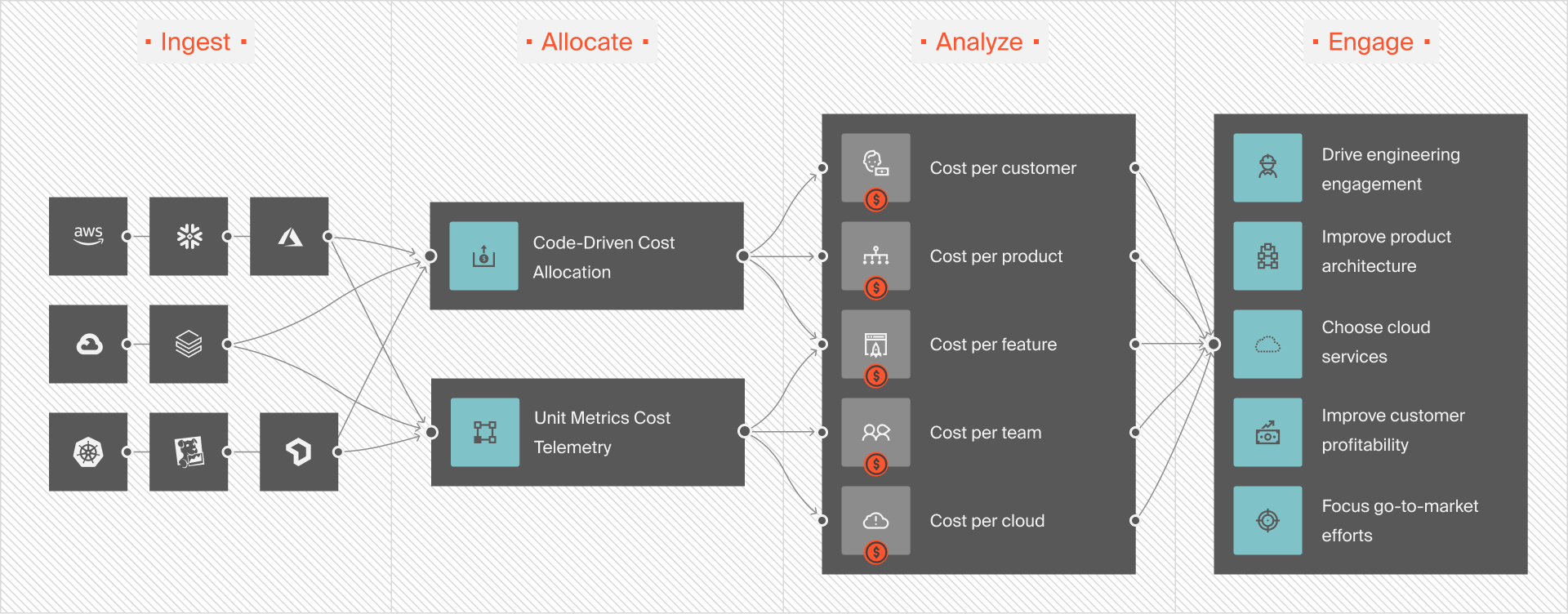
For example: If a production environment runs on a $12/month Lightsail instance, a $15/month managed database, an $18/month load balancer, and periodic snapshot costs, CloudZero gives you one total for that environment, updated hourly, without manual reconciliation.
The same logic applies when Lightsail is part of a broader stack. A product might use Lightsail for its web tier, RDS for its database, and S3 for static assets. CloudZero allocates all three to the same product dimension, so you see cost per product rather than three disconnected service bills.
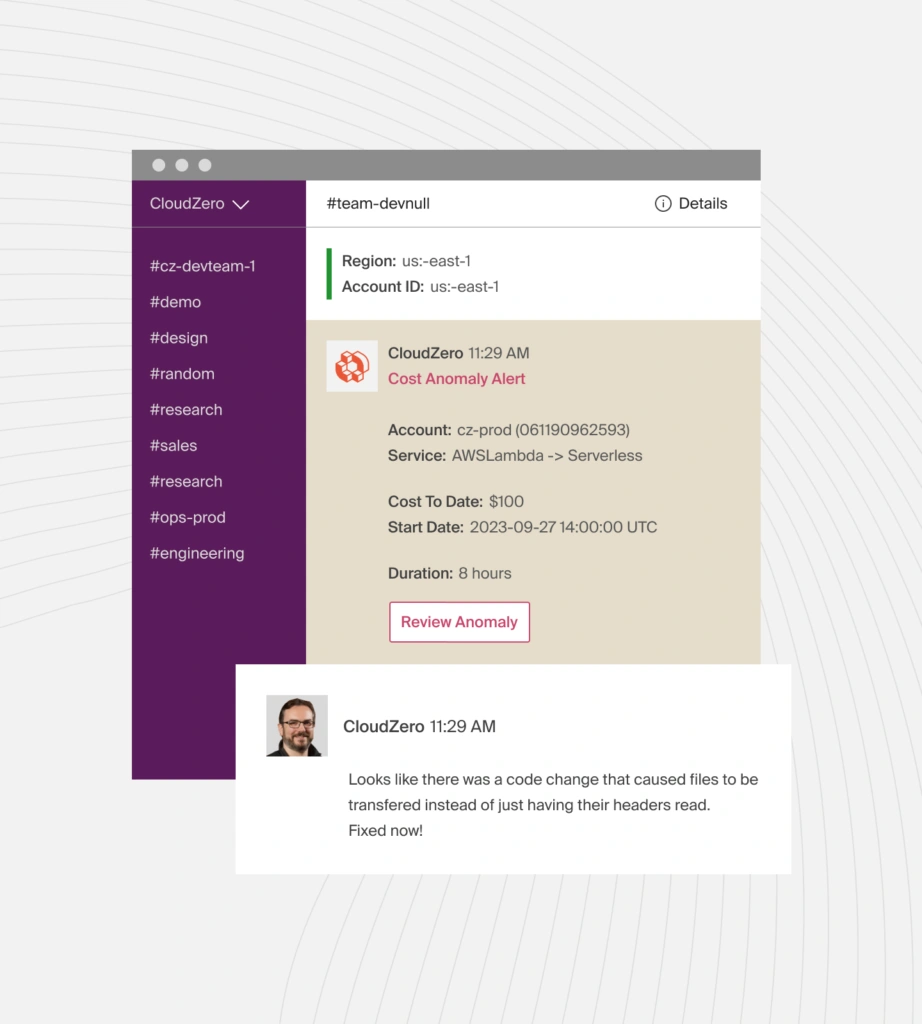
For teams closely tracking data transfer costs, CloudZero’s anomaly detection flags abnormal spend before overages compound. If a deployment pushes an instance past its monthly transfer cap, you’ll know within hours, not at billing time.
You can also use CloudZero Advisor to compare Lightsail plan sizes against equivalent EC2 configurations, factoring in Reserved Instance or Savings Plan pricing. That comparison is hard to make from the AWS console alone because EC2 and Lightsail costs appear in separate service buckets with different billing structures. With CloudZero, you can see both in context and make a data-driven decision about whether a workload should stay on Lightsail or migrate to EC2.
Leading global organizations use CloudZero to turn cloud cost visibility into real outcomes: Upstart reduced cloud spend by $20M, PicPay saved $18.6M annually, and Neon increased engineering cost ownership by 700% — all by moving beyond service-level billing to understand what their cloud actually costs the business. If you’re ready to do the same, take a free tour of CloudZero,  , or start with a free cloud cost assessment.











