
Kubernetes and OpenStack are not competitors. They operate at different layers of the stack and are often used together.
OpenStack manages cloud infrastructure such as compute, storage, and networking. Kubernetes runs on top of that infrastructure to deploy, scale, and manage containerized applications.
Teams often compare them as alternatives, but in practice, Kubernetes frequently runs on OpenStack.
Understanding this relationship helps teams design scalable architectures and avoid incorrect tooling decisions.
What Does Kubernetes Do?
Kubernetes is an open-source container orchestration platform that manages how containerized applications are deployed, scaled, and kept running.
Kubernetes schedules containers onto compute resources, groups them into pods, and continuously monitors their health. If a container fails, Kubernetes automatically restarts, replaces, or reschedules it to maintain the desired state.
Kubernetes does not manage infrastructure. It assumes compute, networking, and storage are already in place and focuses solely on running applications reliably across that infrastructure.
Because of this design, Kubernetes can run on public or private clouds, on-premises environments, or on top of platforms such as OpenStack.
Related read: Kubernetes Node Vs. Pod Vs. Cluster: What’s The Difference?
Report
Finance needs to prove AI’s return: CloudZero report
260 senior finance leaders (more than half CFOs) told us why the speed of seeing AI spend, not the size of it, separates who pulls ahead on AI from who gets burned.
What Does OpenStack Do?
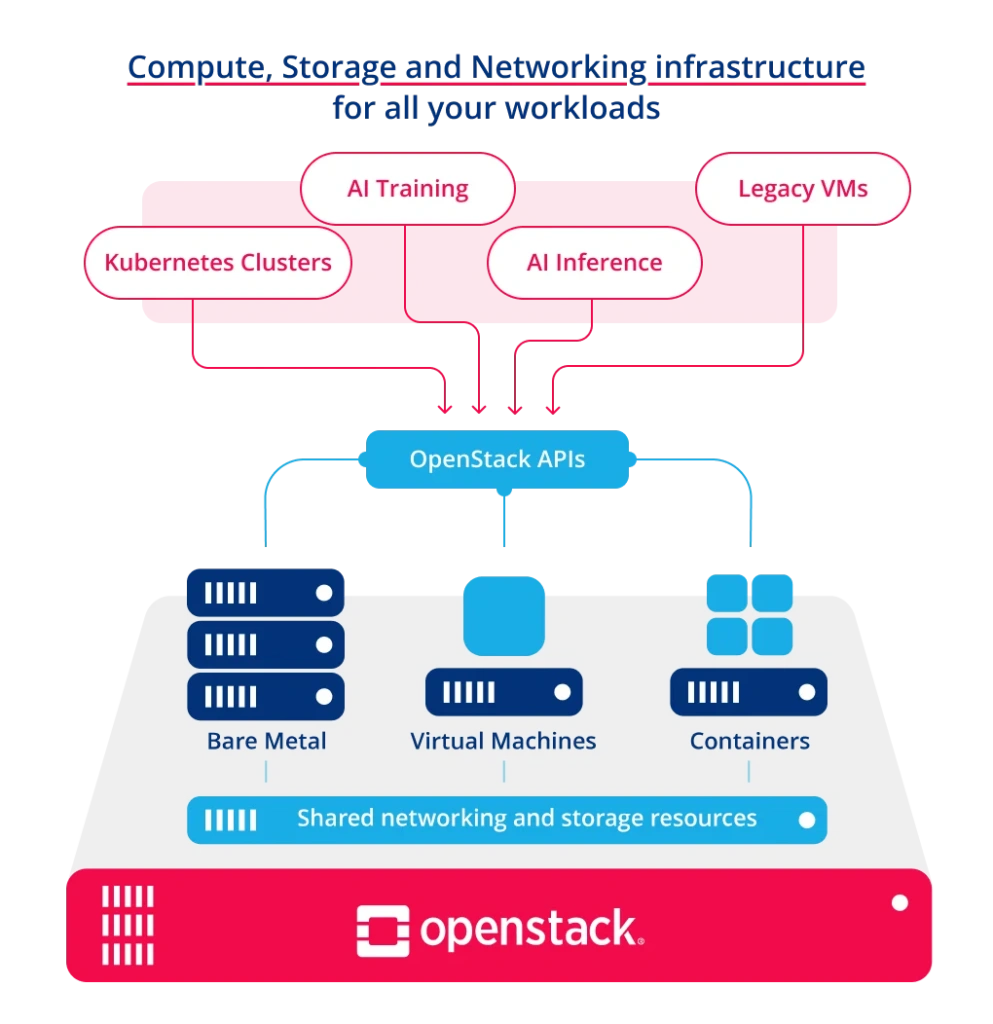
OpenStack is an open-source cloud platform that provisions infrastructure resources like virtual machines, networking, and storage. It abstracts physical hardware into pooled compute, network, and storage services exposed via APIs.
Unlike Kubernetes, it doesn’t manage applications. It manages the infrastructure they run on.It provides the foundation on which workloads run, but does not manage how applications are deployed or scaled inside containers.
As a result, OpenStack is commonly used to host virtual machines and to serve as the underlying infrastructure for platforms such as Kubernetes.
So, how are Kubernetes and OpenStack different?
OpenStack Vs. Kubernetes: What Are The Differences?
Both Kubernetes and OpenStack are enterprise-grade, open-source, and community-driven projects. The OpenInfra Foundation (now part of the Linux Foundation) oversees OpenStack’s development, while the CNCF governs Kubernetes.
Despite these similarities, there are a few notable differences. By comparing OpenStack and Kubernetes, you can tell if they complement each other or if you need to choose one over the other.
1. Cloud computing platform vs. container orchestration software
OpenStack is a cloud infrastructure platform. It provisions and manages compute, storage, networking, and bare metal.
Kubernetes is a container orchestration platform. It deploys, scales, and maintains containerized applications.
While OpenStack enables you to build and manage public or private cloud infrastructure, Kubernetes automates most of the tasks required to deploy, scale, and manage the health of your containerized applications at scale.
2. Automated vs. hands-on deployments
Automating operations and boosting productivity are two of the benefits Kubernetes and OpenStack provide. Both offer web interfaces for easy management.
OpenStack focuses on resource provisioning. You request capacity, and OpenStack allocates it.
Kubernetes focuses on desired state management. You define how applications should run, and Kubernetes continuously enforces that state.
Note: While Kubernetes automates container management, OpenStack uses a suite of components and services to automate cloud infrastructure provisioning and management. Still, OpenStack requires more manual effort than Kubernetes.
Useful resource: What Is Container Orchestration? A Newbie-Friendly Guide
3. Support for containerized vs. non-containerized applications
OpenStack manages VMs and bare-metal servers, making it suitable for both modern and legacy workloads, while Kubernetes runs only containerized applications.
Kubernetes manages containers only. Applications have to be containerized to run on Kubernetes.
Related read: 10 Best Kubernetes Alternatives (By Category)
4. Networking: Neutron vs. CNI Plugins
OpenStack handles networking through Neutron, its software-defined networking service. Neutron creates networks, subnets, routers, and security groups through APIs, with the underlying implementation using VLANs, VXLAN overlays, or physical network devices. It manages networking at the infrastructure level, connecting VMs and bare-metal servers to each other and to the outside world.
Kubernetes takes a different approach. It relies on Container Network Interface (CNI) plugins — such as Calico, Cilium, or Flannel — to configure pod-to-pod networking within a cluster. When Kubernetes runs on OpenStack, these CNI plugins can use Neutron’s APIs to provision network resources, making pod network configuration portable across environments.
5. All cloud-native or transitioning from traditional computing
A Kubernetes deployment is ideal for teams that are cloud-native or have a deep understanding of cloud-native practices.
Such teams have experience with distributed version control systems such as Git and source code management platforms such as GitHub, GitLab, and Bitbucket.
They have used containerization, continuous integration (CI), continuous deployment (CD), automated testing, and canary deployments, among other cloud-first technologies and skills.
OpenStack supports both traditional and modern workloads. It is commonly used to run virtual machines and gradually modernize existing environments.
Note: The simplest way to deploy OpenStack is to purchase a private cloud from an OpenStack-powered provider. It’s a great way to get all the OpenStack features you need without creating your own private cloud from scratch.
Are Kubernetes And OpenStack Competitors
While once seen as competitors, Kubernetes and OpenStack are now widely used together. OpenStack provides the infrastructure layer — compute, storage, networking — while Kubernetes runs containerized workloads on top. Together, they offer a scalable, cloud-native stack.
The integration between them is well-established and runs through standardized interfaces. Kubernetes communicates with OpenStack through the Cloud Controller Manager (CCM), which provisions load balancers via Octavia and manages node lifecycle through Nova. For persistent storage, the Container Storage Interface (CSI) driver requests volumes from Cinder, giving pods access to block storage without manual provisioning. And when Kubernetes runs on OpenStack, CNI plugins tap into Neutron’s networking APIs to configure pod connectivity — all without provider-specific code.
Many organizations are deploying OpenStack for Network Function Virtualization (NFV), and many of these network operators are increasingly running Virtual Network Functions (VNFs) in containers orchestrated by Kubernetes.
Take a look:
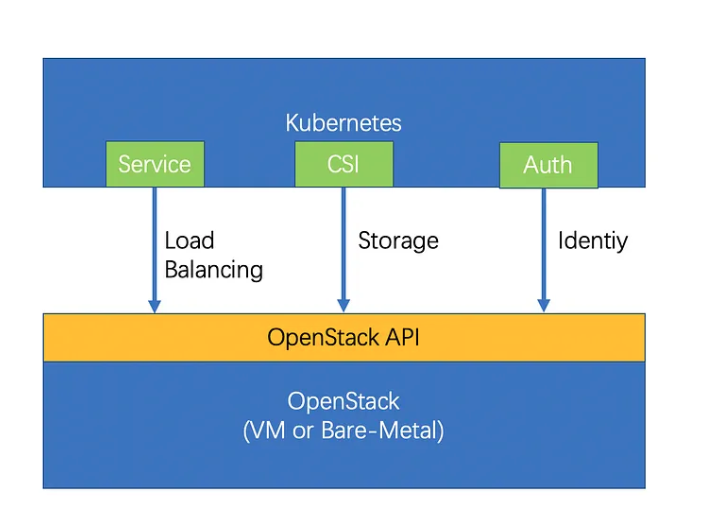
Credit: Kubernetes on top of OpenStack Bare-Metals and VMs
The relationship is also evolving in both directions. KubeVirt, a CNCF incubating project, now allows Kubernetes to manage traditional virtual machines alongside containers. With v1.8 (released March 2026) adding multi-hypervisor support, teams can run both VMs and containers on a single Kubernetes control plane — meaning some workloads that once required OpenStack can now run directly on Kubernetes. On the other side, some teams run the OpenStack control plane itself inside Kubernetes containers, making OpenStack easier to upgrade and operate.
For most teams running private cloud infrastructure, the practical answer is both — OpenStack managing the foundation and Kubernetes orchestrating the applications.
When To Use Kubernetes
Kubernetes is the right choice when your team is building or running containerized applications and needs automated deployment, scaling, and self-healing across infrastructure.
Cloud-native application development. If you’re building microservices from scratch or refactoring existing applications into containers, Kubernetes provides the orchestration layer to manage service discovery, rolling updates, and health checks across hundreds of pods.
Production container workloads at scale. Kubernetes’ architecture scales horizontally, and its self-healing capabilities — automatic restarts, rescheduling, and replica management — reduce the operational burden of keeping distributed applications running reliably.
Multi-environment portability. Kubernetes runs on any infrastructure: on-premises, in public clouds like Google Kubernetes Service (GKE) and Amazon Elastic Kubernetes Service (EKS), or on top of OpenStack. Teams that need to avoid locking into a single provider benefit from this flexibility.
CI/CD-driven workflows. Teams already practicing continuous integration and deployment can use Kubernetes’ declarative model — define the desired state in YAML, and let Kubernetes converge toward it — to automate canary deployments, blue-green rollouts, and automated rollbacks.
When To Use OpenStack
OpenStack makes sense when your organization needs to build and control its own cloud infrastructure rather than relying entirely on a public cloud provider.
Private cloud infrastructure. If your business requires data sovereignty, regulatory compliance, or simply wants to avoid the escalating costs of public cloud, OpenStack lets you build a fully functional private cloud with compute, storage, and networking — all managed through APIs and a self-service portal.
Mixed workload environments. OpenStack handles virtual machines, bare-metal servers, and containers side by side. Organizations transitioning from legacy applications to cloud-native architectures can run both on the same platform without forcing everything into containers prematurely.
Network Function Virtualization (NFV). Telecom operators and enterprises running network functions at scale rely heavily on OpenStack, which remains the dominant platform for NFV workloads in 5G and edge deployments.
Infrastructure-level control. When you need fine-grained control over networking (via Neutron), storage backends, compute scheduling, and bare-metal provisioning, OpenStack gives you direct access to infrastructure primitives that public cloud providers abstract away.
How To Track, Control, And Optimize Your Container Costs
Both Kubernetes and OpenStack provide powerful platforms for deploying, running, and managing containerized applications. Both are highly scalable and highly available, and they support an impressive level of automation.
In practice, however, these same features tend to blindside cost management.
In the case of OpenStack, for example, configuring your own infrastructure can lead to overprovisioning, increasing costs. In Kubernetes, the high scalability can quickly consume resources, leading to a surprise cloud bill.
To prevent these surprises, you’ll need a robust platform to help you track, manage, and optimize your Kubernetes costs. With CloudZero’s unique code-driven approach, you can more accurately aggregate, normalize, and analyze your infrastructure and application costs at any scale.
Then, CloudZero translates the data into easy-to-digest insights, like:
- Cost per customer
- Cost per product
- Cost per software feature
- Cost per development team
- Cost per deployment,
- Cost per environment
- Cost per service, and more
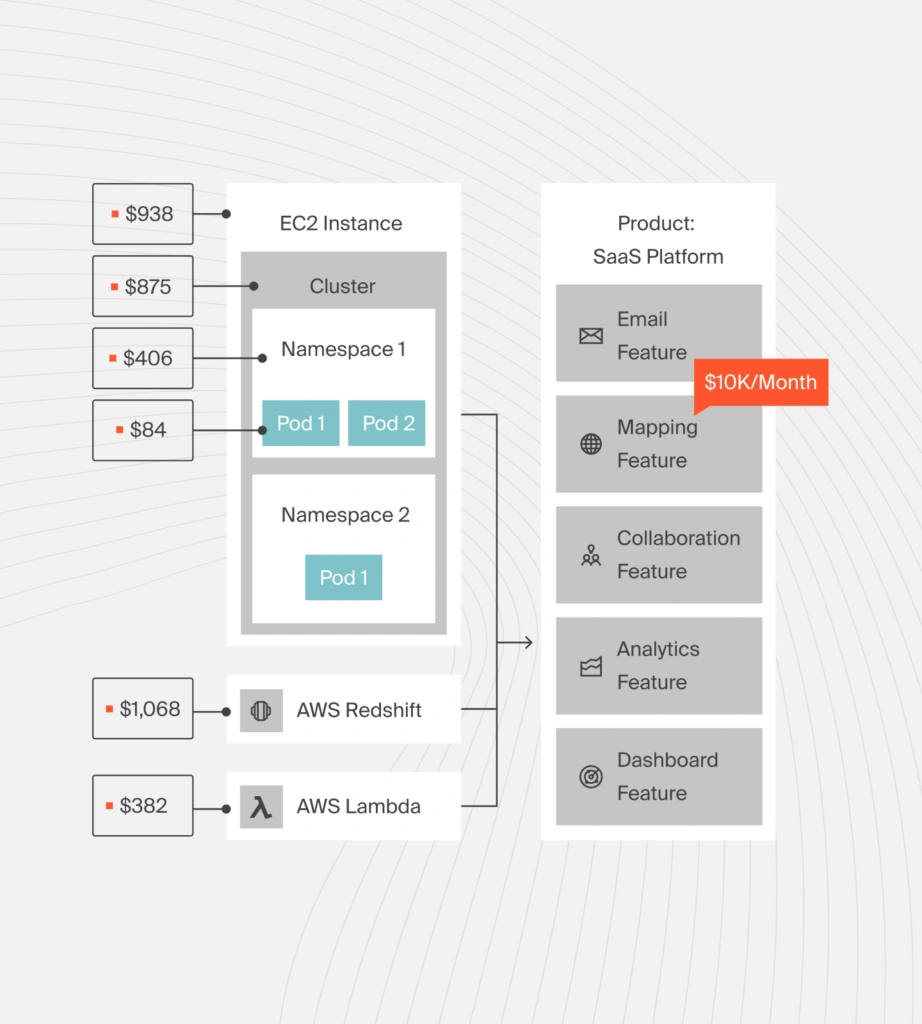
For example, CloudZero’s Kubernetes Cost Analysis helps you understand how much each pod, node, namespace, cluster, and other K8s concepts cost you. If you want to simplify your analysis, you can also use CloudZero to combine and compare costs across your containerized and non-containerized infrastructure.
With our real-time cost anomaly detection and noise-free alerts, you’ll be aware of potential overspending issues and can stop them.
 to see all of this and more of CloudZero’s capabilities in action.
Frequently Asked Questions about Kubernetes vs. OpenStack











