
You can have a cloud strategy, but reality hits when the “can’t-move” workload shows up.
Most organizations move fast in AWS until regulatory rules, latency requirements, or legacy systems force parts of the stack to remain on-premises. What begins as a reasonable exception often turns into two operating models, extra controls to manage, and growing friction between teams.
The real challenge here isn’t where workloads run. It’s who controls them. Engineers want the speed and consistency of AWS. Security and operations need stable, predictable applications. Finance needs clear ownership and visibility. Hybrid environments try to satisfy all three, but usually complicate them instead.
AWS Outposts was created to address this tension by extending AWS infrastructure and services into on-premise environments.
In this article, we break down what AWS Outposts actually is, when it makes sense to use it, and how to optimize hybrid cloud costs.
What Is AWS Outposts?
AWS Outposts is an AWS-managed infrastructure service that brings the same AWS hardware, APIs, and control plane used in AWS Regions into an organization’s own data center or on-premise environment.
Outposts doesn’t migrate workloads to the cloud. It brings AWS to your data center. Workloads stay local, but they’re deployed, managed, and secured using the same AWS APIs, consoles, and IAM policies you’d use in the cloud. This is what distinguishes Outposts from traditional on-premise or private cloud environments.
AWS remains responsible for the underlying infrastructure, while customers run workloads locally using the same operational model they use on AWS.
Research Report
FinOps In The AI Era: A Critical Recalibration
What 475 executives told us about AI and cloud efficiency.
How AWS Outposts Works
AWS installs the Outpost in your data center, where it functions as an extension of an AWS Region. It connects via WAN to the Region and via LAN to local workloads, enabling seamless hybrid integration.
And for this to work, your on-premises network has to support two connections. A wide area network (WAN) connection back to the AWS Region, and local network access for on-site workloads and applications. These connections allow Outposts to stay integrated with AWS while serving local systems.
You can launch Amazon EC2 instances and create attached Amazon EBS volumes on the Outpost using an Outpost subnet. These workloads run on-premises but are managed using the same AWS consoles/APIs and IAM controls as those used in AWS Regions.
Each Outpost maintains a persistent connection to its parent AWS Region. This connection is required because most AWS services continue to run in the Region, even when compute runs locally. The Region manages identity, service coordination, and access to shared AWS services.
Networking works by extending your Amazon VPC onto the Outpost. You create dedicated subnets for the Outpost, similar to how you create subnets for an Availability Zone. Instances running on the Outpost use private IP addresses and communicate with other VPC resources over private networking.
Note: Some services, such as Amazon S3 and DynamoDB, don’t run locally and can only be accessed through the Region, using VPC gateway endpoints. This ensures traffic remains within the AWS network rather than traversing the public internet.
Outposts brings AWS compute to your data center, not the entire AWS cloud.
For more complex network layouts: Outposts integrates with standard AWS networking components such as:
- Internet Gateway (IGW): For internet-bound traffic
- Virtual Private Gateway (VGW): For VPN connections to on-premise
- Transit Gateway (TGW): To centralize routing across VPCs and on-premise
- VPC Peering: To connect other VPCs privately
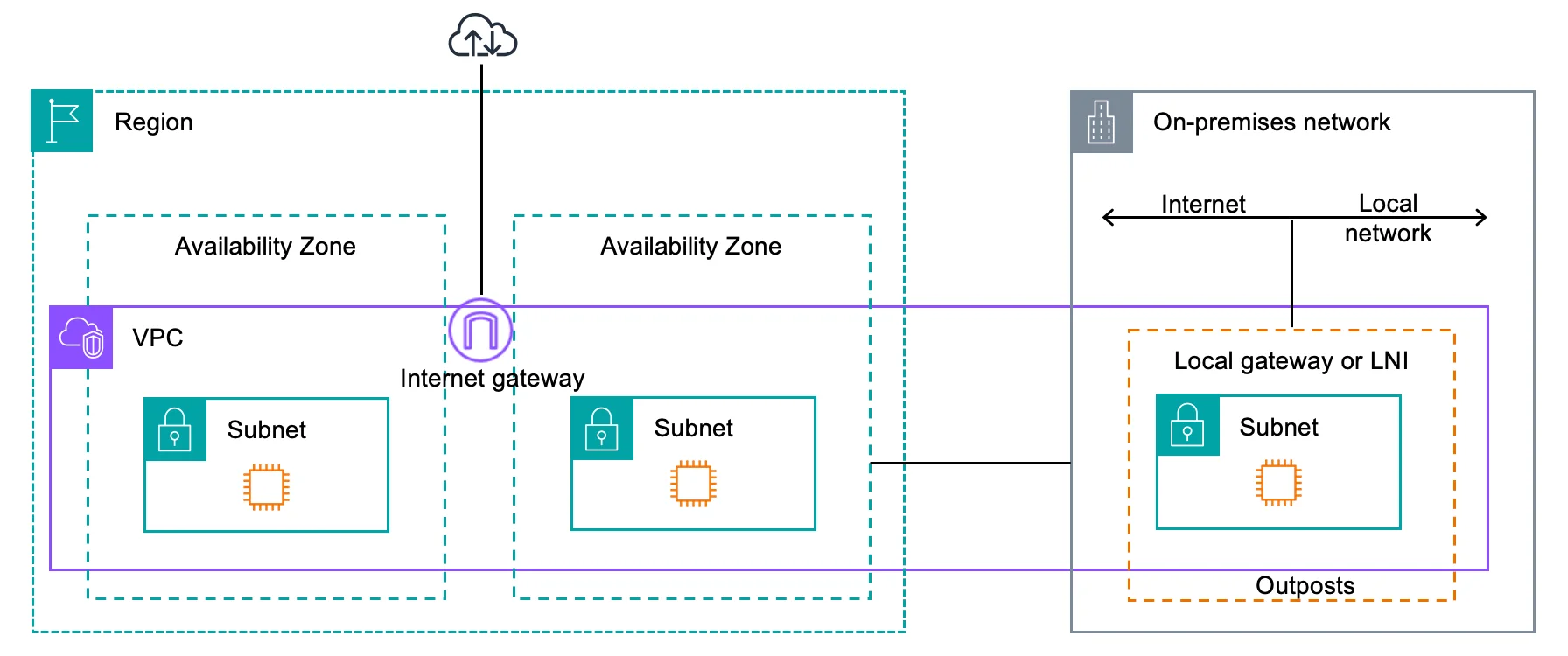
The result is a hybrid environment where compute and storage run locally, while identity, networking control, monitoring, and regional services remain centralized in AWS.
Note: AWS Outposts workloads can use DynamoDB through their parent AWS Region, but DynamoDB does not run on Outposts. Teams that need local database execution can instead run self-managed databases such as MongoDB directly on Outposts. Read our in-depth guide DynamoDB Vs. MongoDB to learn how these databases differ.
So, when would you want to use Outposts?
AWS Outposts Use Cases
AWS Outposts is not designed for general cloud migration. These use cases share one thing in common: the workload cannot move, but the operating model has to.
Low-latency workloads near on-site systems
Some applications demand very low latency between compute and nearby systems, such as manufacturing equipment, telecom infrastructure, or on-site analytics. Running these workloads in a remote Region introduces delays. Outposts ensures compute is physically close while preserving AWS consistency.
Data residency and regulatory constraints
Certain workloads have to remain on-premises to meet legal, regulatory, or compliance requirements. This is common in financial services, healthcare, and government environments. Outposts enables AWS workloads to run on-premises while meeting strict data residency requirements.
Legacy applications that cannot be refactored
Most critical on-premise applications were not designed for cloud environments and are risky or costly to rewrite. These applications often depend on local storage or fixed network assumptions. Outposts enables teams to modernize how these workloads are operated without changing the application itself.
Disconnected or intermittently connected environments
Some locations cannot rely on continuous, high-quality connectivity to an AWS Region. Applications still need to run locally even when WAN connectivity is limited or unstable. Outposts supports local execution while maintaining AWS integration when connectivity is available.
On-premise data processing before cloud ingestion
In some environments, raw data volumes are too large, expensive, or restricted to send directly to the cloud. Compute runs locally to process or reduce data, then send only the required results to downstream AWS services. But this doesn’t mean AWS Outpost itself is free.
So, how much does it cost to use AWS Outposts?
AWS Outposts Pricing: How It Really Works
Unlike most AWS services, AWS Outposts pricing is contract-based, not usage-only. You pay for on-premise AWS capacity reserved for you, plus separate charges for the services and storage you run on top of it.
Think of Outposts pricing in four layers, in this order, with each billed separately.
Outposts infrastructure pricing
This is the non-negotiable base cost. You pay for:
- The Outposts rack or server hardware
- Installation and delivery
- Infrastructure service and maintenance
- Firmware and platform updates
This cost is:
- Fixed by contract term (1-year or 3-year)
- Paid monthly or upfront
- Charged whether workloads are running or not, and doesn’t include application-level services, databases, or additional storage usage.
Compute capacity (EC2 on Outposts)
You run Amazon EC2 instances directly on the Outpost.
- EC2 capacity is reserved as part of the rack or server
- You do not pay on-demand EC2 rates like in an AWS Region
- You pay for the capacity you committed to, whether fully used or not
This is different from cloud EC2:
- In the cloud, you pay per hour of usage. Here’s a complete guide to EC2 pricing
- On Outposts, you pay for reserved physical capacity
This is why right-sizing matters more for Outposts than for cloud EC2, as you’ll see in a few minutes.
Storage charges (EBS and S3 on Outposts)
Storage is billed separately from the Outposts infrastructure.
Amazon EBS on Outposts
- Charged per GB of provisioned storage
- Snapshot storage is also billed separately
- Performance tiers apply, just like in AWS Regions
See detailed Amazon EBS pricing here.
Amazon S3 on Outposts
- Storage capacity is billed per GB
- No separate charge for S3 API requests
- Data stored locally on the Outpost
This mirrors cloud pricing behavior, but capacity lives on-premise. Read how Amazon S3 pricing works in the cloud.
Service and data transfer charges (variable)
Some AWS managed services have additional charges when run on Outposts.
Common examples include:
- Amazon RDS on Outposts is charged a per-instance, per-hour management fee. See RDS pricing here.
- Marketplace software licenses. See AWS Marketplace
- Data transfer between Outposts and AWS Regions
- Data transfer from Outposts to the parent AWS Region is free
- Data transfer between Outposts and your on-premises network (via the Local Gateway) is free, including internet egress through the Local Gateway
- Data transfer from the AWS Region to Outposts is billed at standard AWS regional data transfer rates. Read more: AWS Data Transfer Pricing Guide And How To Reduce Costs
- VPC endpoint traffic, where applicable. See our guide on Amazon VPC Pricing: Cost Factors And Savings Strategies
AWS offers multiple ways to pay for Outposts capacity:
- 1-year or 3-year terms
- All Upfront, partial upfront, or monthly payments
- When a term expires, pricing automatically converts to a monthly rate if not renewed
Longer terms reduce the effective monthly cost, similar to Savings Plans, but with physical capacity.
Outposts pricing = Reserved on-premise AWS infrastructure + separate charges for compute capacity, storage, and services.
You pay for the box, then you pay for what you run inside it.
Is AWS Outposts Expensive?
AWS Outposts is more expensive than running the same workloads in an AWS Region, but that comparison is often misleading. Outposts is priced as reserved, on-premises infrastructure managed by AWS, not Elastic Compute Cloud (EC2). You are paying for physical capacity that exists whether workloads are busy or idle.
Outposts becomes even more expensive when used as a cloud EC2 alternative for bursty, unpredictable, or easily movable workloads. In those cases, the lack of elasticity results in you paying for unused capacity. This is why Outposts is not positioned as a cost-optimization service.
But, for workloads that must remain on-premises, Outposts is often comparable to, or cheaper than, alternatives such as building a private cloud, refreshing hardware every few years, or maintaining custom integrations between on-premises applications and AWS. In those environments, Outposts replaces multiple cost centers with a single, predictable contract.
The key difference is predictability versus elasticity. Outposts’ spend is fixed and known upfront, which reduces surprise bills but requires careful sizing. When capacity is right-sized and workloads are stable, Outposts’ costs are controlled. When capacity is oversized or poorly allocated, costs can spike.
Related read: What Is Cloud Elasticity? (And How Does It Affect Cloud Spend?)
Still, AWS Outposts is not a cheap cloud. You need to understand where costs come from, who owns them, and how they scale over time in a hybrid environment.
Hybrid And Multi-Cloud Cost Intelligence With CloudZero
AWS Outposts pricing starts with a fixed capacity commitment. Total spend, however, can be harder to interpret when workloads use both local Outposts resources and regional AWS services.
Compute runs locally on the Outpost. Storage grows over time through EBS volumes and snapshots. Regional services, such as S3, DynamoDB, and RDS, add cost because applications still depend on them.
Kubernetes clusters scale pods and nodes. Data platforms move data between applications. These costs are causally related at the workload level, but AWS billing presents them as separate service line items, which can make hybrid cost behavior hard to interpret.
This is where organizations lose clarity. A spike in spend might appear in S3, but the cause could be an on-premise analytics job. Rising EBS costs may be due to a change in Kubernetes configuration. Regional charges might exist only because compute runs locally. Without context, it’s hard to tell what’s driving what.
See: Kubernetes Cost Optimization: 9+ Ways To Lower Costs in 2026
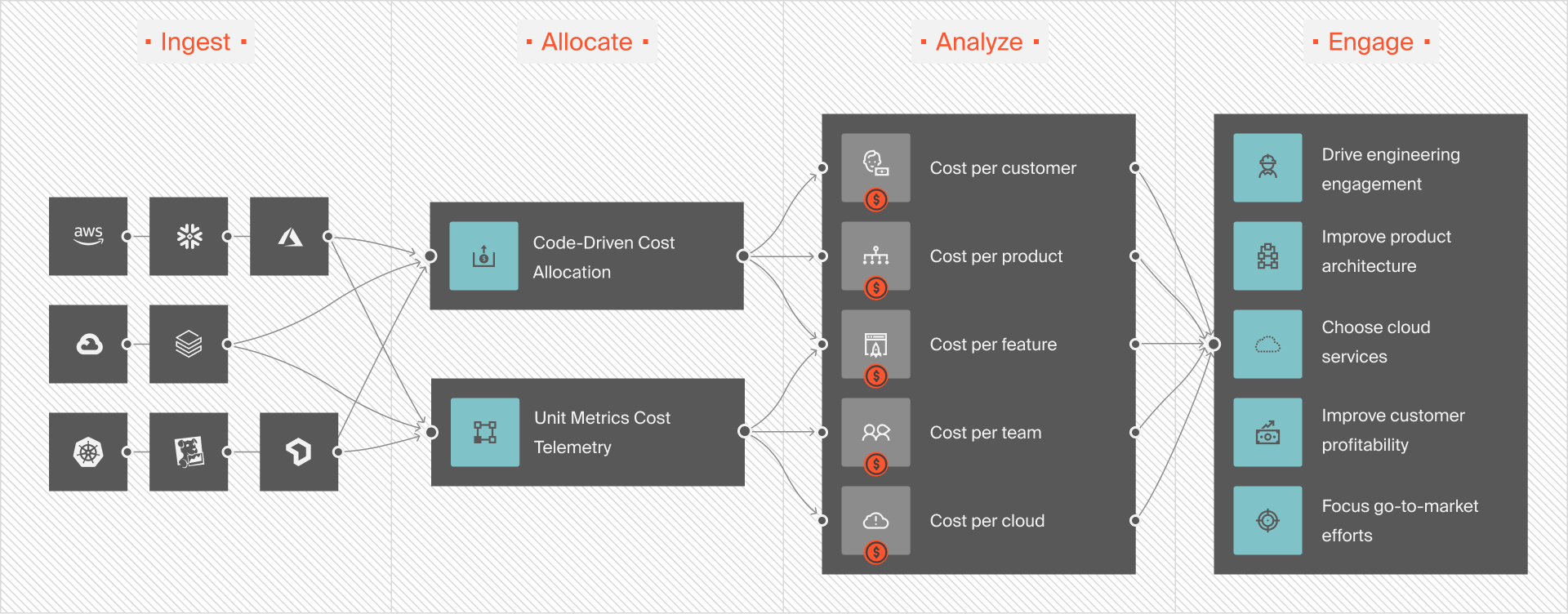
CloudZero addresses this by stitching Outposts infrastructure costs together with the AWS services layered on top of them. It attributes spend across EC2, EBS, S3, RDS, DynamoDB, EKS, and all other AWS services back to the workloads, teams, and environments that created it. Instead of separate service charges, teams see a single workload-level cost view across on-premises and cloud environments.
Related reads:
CloudZero also flags unexpected cost behavior in real time. If a misconfiguration causes Lambda usage to spike or a workload suddenly increases regional data transfer, CloudZero detects the anomaly and surfaces it with context. These issues often don’t trigger performance alerts, making them easy to miss in hybrid environments.
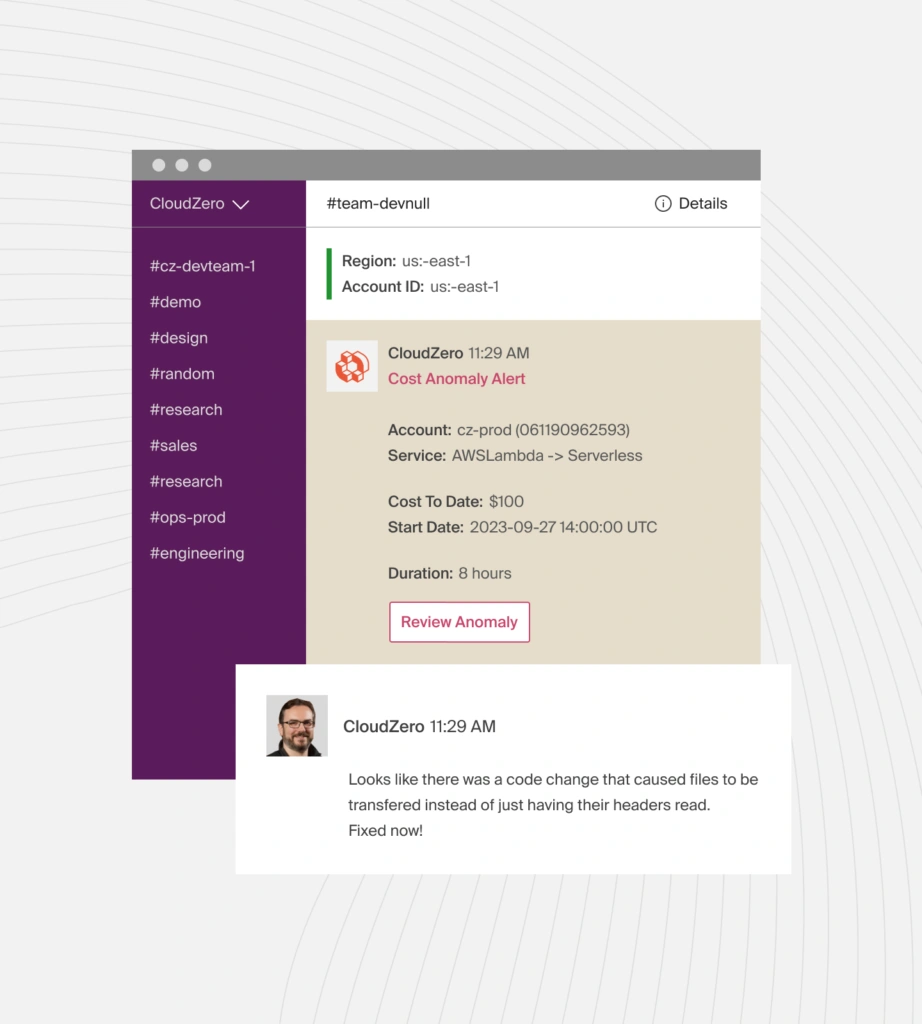
And because AWS Outposts introduces fixed on-premises capacity alongside variable regional usage, inefficient cost patterns can persist quietly over time. CloudZero Advisor helps surface these inefficiencies by analyzing how Outposts-related and regional AWS charges are actually incurred.
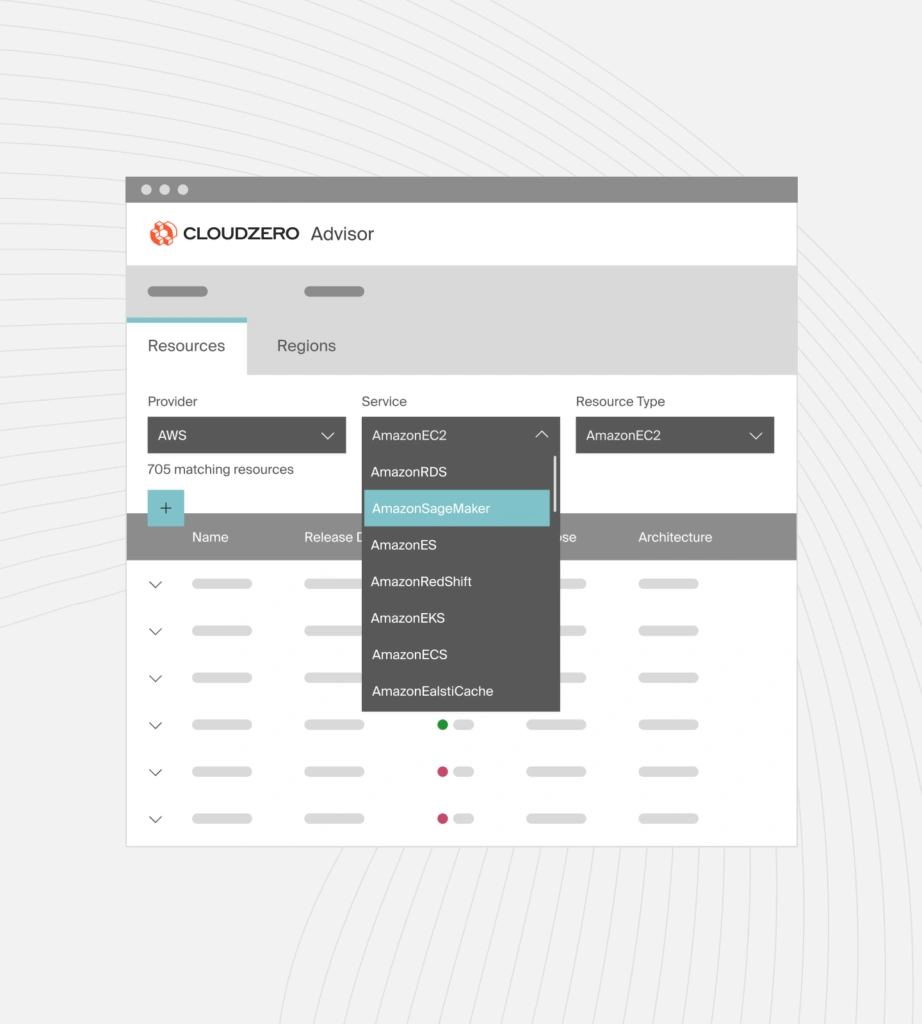
Advisor highlights actionable cost signals such as oversized or underutilized EBS volumes, long-lived snapshots, and unexpected spend growth tied to specific workloads, teams, or environments. It also helps teams spot patterns where hybrid workloads drive higher-than-expected regional costs, such as increased data transfer or reliance on regional services.
 to see CloudZero in action.
Frequently Asked Questions About AWS Outposts


FinOps In The AI Era: A Critical Recalibration
What 475 executives told us about AI and cloud efficiency.