
Imagine you want to launch an application without first building and managing the servers that run it. You write the code, pick how it should run, and then let a platform take care of the rest.
That’s the core promise of AWS Elastic Beanstalk.
In this snackable guide, you’ll understand AWS Elastic Beanstalk well enough to decide if it belongs in your AWS architecture.
What Is AWS Elastic Beanstalk?
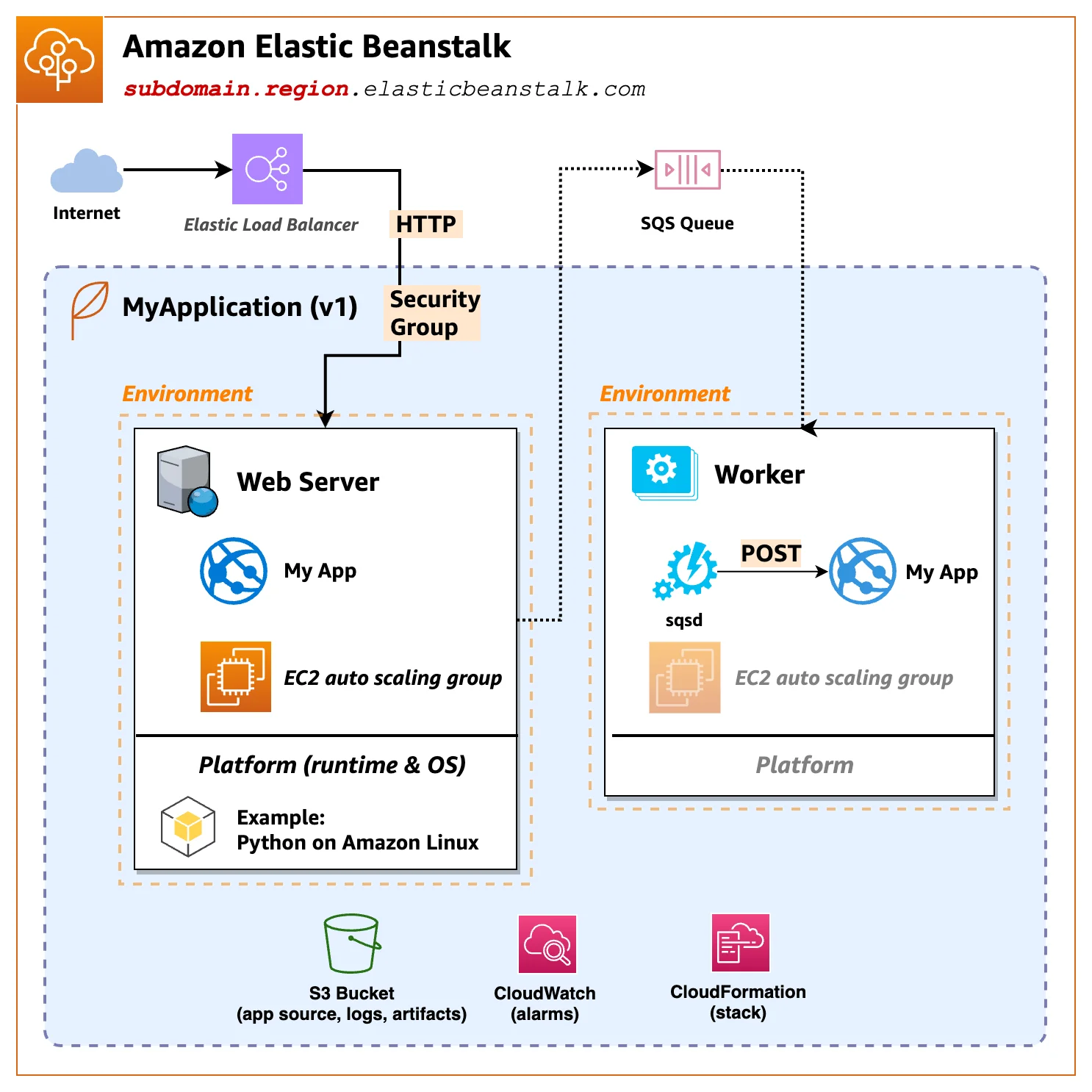
AWS Elastic Beanstalk is a managed AWS service for deploying web applications and backend services on AWS. You upload application code, choose a supported runtime, and Elastic Beanstalk provisions the AWS resources needed to run the application.
Elastic Beanstalk does not replace AWS infrastructure. It orchestrates it.
Applications still run on AWS services such as Amazon EC2, Elastic Load Balancing, Auto Scaling, and CloudWatch. Elastic Beanstalk assembles these services into an application environment and manages their lifecycle.
This is what makes Elastic Beanstalk a Platform as a Service (PaaS) instead of a compute service. You retain access to the underlying resources while avoiding direct infrastructure configuration and routine operations.
How AWS Elastic Beanstalk works
When you deploy your application, you upload a code bundle (for example, a ZIP file or a Docker image). You then select a platform that includes a runtime, web server, and operating system.
Elastic Beanstalk then creates an environment (a collection of AWS resources configured to run your application). It then provisions the core AWS services needed to support your application.
Compute instances (usually Amazon EC2) run your app code, and load balancers distribute traffic. Auto scaling groups to adjust capacity based on load and performance signals, and health monitoring that tracks resource and application health.
Elastic Beanstalk manages these resources as a single logical deployment, using AWS APIs to configure, launch, and monitor them as a unit.
After provisioning, Elastic Beanstalk continuously monitors the environment and can perform operational tasks such as scaling according to demand, rolling updates, and health checks.
Elastic Beanstalk environments also integrate with other AWS services to provide additional functionality. These include:
- CloudWatch for detailed performance metrics and alarms
- Amazon RDS, when your application needs a managed database (optional)
- S3 to store application versions and deployment bundles
- VPC for networking control and isolation
2026 State of AI Spend Report
Why Finance Caps What It Can’t See
Learn how finance leaders are managing AI spend, and how they’re approaching FY2027
What AWS Elastic Beanstalk Manages Vs. What You Manage
AWS Elastic Beanstalk draws a clear line between application responsibility and infrastructure operations.
What AWS Elastic Beanstalk manages
Elastic Beanstalk handles the operational mechanics of running an application environment.
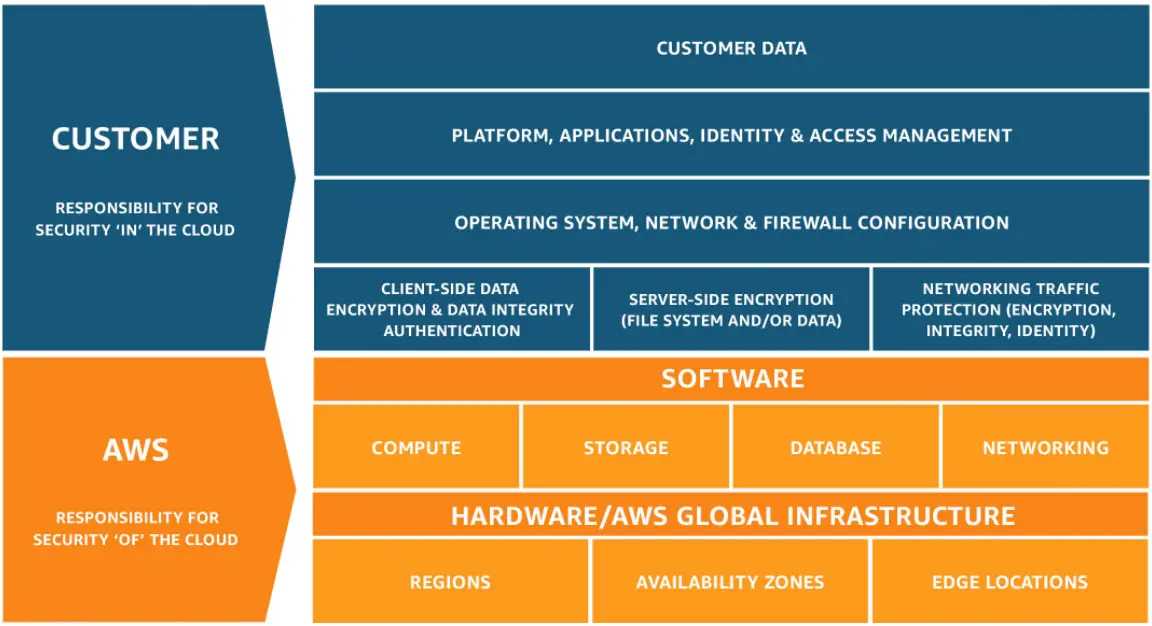
This includes:
- Provisioning and maintaining compute capacity
- Configuring load balancing and traffic routing
- Applying scaling policies and reacting to demand
- Monitoring environment health and replacing unhealthy instances
- Coordinating deployments and environment updates
These responsibilities are managed at the environment level, so the application runs as a single, monitored system instead of disconnected resources.
What you’re responsible for
You remain responsible for everything that defines how your application behaves and how costs scale:
- Application code and dependencies
- Runtime and platform selection
- Environment configuration and scaling thresholds
- Instance types and capacity limits
- Networking choices, including VPC placement
- Security configuration and access controls
- Cost exposure tied to resource usage
You can also access, modify, or replace any underlying AWS resource directly if needed.
Takeaway: Elastic Beanstalk removes routine operational work, but not ownership..You gain speed and consistency at the infrastructure layer, while still making architectural, performance, and cost decisions at the application layer.
When Would You Want To Use AWS Elastic Beanstalk?
You would choose Elastic Beanstalk when:
- You want to deploy an application fast using standard AWS patterns
- Your application follows a conventional web or API architecture
- You don’t need deep customization of the operating system or orchestration layer
- Your team prefers AWS-managed defaults over hand-rolled infrastructure
- You want production-ready environments without designing them from scratch
- You expect traffic to change, but don’t want to manage scaling logic manually
- You need separate environments for development, staging, and production with minimal configurations
The Benefits Of Using AWS Elastic Beanstalk
Here’s the thing. The value of AWS Elastic Beanstalk comes from operational leverage, not abstraction.
Main advantages include:
- Speed. Applications move from code to running environment without custom provisioning logic.
- Reduced operational overhead. Environment health, scaling actions, and deployments are handled at the platform level.
- Consistency across environments. Development, staging, and production environments follow the same deployment model.
- Direct access to AWS resources. You can inspect, modify, or replace underlying services at any time.
- Predictable architecture patterns. Environments follow AWS-recommended configurations, reducing design guesswork.
- Gradual path to other AWS services. Applications can later move to EC2, ECS, or EKS without a full rewrite.
Common AWS Elastic Beanstalk Pitfalls To Avoid
The most common Elastic Beanstalk pitfalls stem from misaligned expectations rather than platform flaws.
- Treating Elastic Beanstalk as fully serverless. Elastic Beanstalk still relies on EC2-based environments. Ignoring instance sizing, scaling limits, or health checks can lead to instability.
- Overloading environments with configuration changes. Heavy use of .ebextensions and ad-hoc tweaks can make environments hard to reason about and harder to debug.
- Ignoring environment health signals. Yellow or degraded states are often dismissed, even though they usually point to scaling, memory, or application-level issues.
- Letting application versions accumulate in S3. This can lead to bloated storage and failed deployments. Without cleanup policies, deployments can fail or become harder to manage.
- Assuming deployments are always predictable. Rolling updates, platform updates, and instance replacements can occasionally fail without clear surface-level errors.
- Using Elastic Beanstalk for workloads it wasn’t designed for. Complex container orchestration, event-driven systems, or highly customized OS requirements often push Elastic Beanstalk beyond its comfort zone.
What Are The Limitations Of AWS Elastic Beanstalk?
Elastic Beanstalk trades flexibility for convenience. That tradeoff is intentional, but it also introduces real constraints you should understand before committing.
- Limited infrastructure customization. You can access underlying resources, but Elastic Beanstalk controls how environments are integrated and updated.
- Opinionated deployment model. Applications are expected to follow conventional web or API patterns rather than highly specialized architectures.
- Not designed for advanced container orchestration. Docker is supported, but features common in ECS or Kubernetes, such as fine-grained scheduling or service meshes, are out of scope.
- Slower iteration for complex deployments. Environment creation, updates, and rollbacks can take minutes. This may feel slower than container-native workflows.
- Limited infrastructure-as-code (IaC) suppotr. Elastic Beanstalk is not a full IaC platform, which makes large-scale, fully declarative environment management harder.
- Cost visibility is indirect and fragmented. Because it automatically provisions multiple AWS services, costs are spread across EC2, load balancers, storage, data transfer, and monitoring.
AWS Elastic Beanstalk Pricing
AWS Elastic Beanstalk itself is free to use. There is no additional charge for the service.
You only pay for the AWS resources Elastic Beanstalk creates and manages on your behalf, billed at standard AWS rates.
What Elastic Beanstalk doesn’t charge for
- Creating applications and environments
- Deploying application versions
- Managing environmental health and updates
- Coordinating scaling and load balancing
What you are charged for
Your bill reflects the AWS services running underneath your Elastic Beanstalk environment, including:
- Compute: Amazon EC2 instances used to run your application
- Load balancing: Application or Classic Load Balancers created by the environment
- Auto scaling: Additional EC2 instances added during scaling events
- Storage: Amazon S3 for application versions and logs, Amazon EBS volumes attached to instances
- Monitoring: Amazon CloudWatch metrics, logs, and alarms
- Networking: Data transfer in and out of the environment, NAT gateways, or VPC components if used
How To Manage And Understand AWS Elastic Beanstalk With CloudZero
Elastic Beanstalk groups infrastructure into environments, but AWS bills each underlying service separately. That makes it hard to see what an application actually costs or why spend changes.
CloudZero reconnects those charges by mapping AWS spend back to Elastic Beanstalk environments, applications, teams, and customers. It turns fragmented EC2, load balancing, storage, and data transfer costs into clear, actionable views. This enables teams to understand spend, catch anomalies, and stay within budget as usage scales.
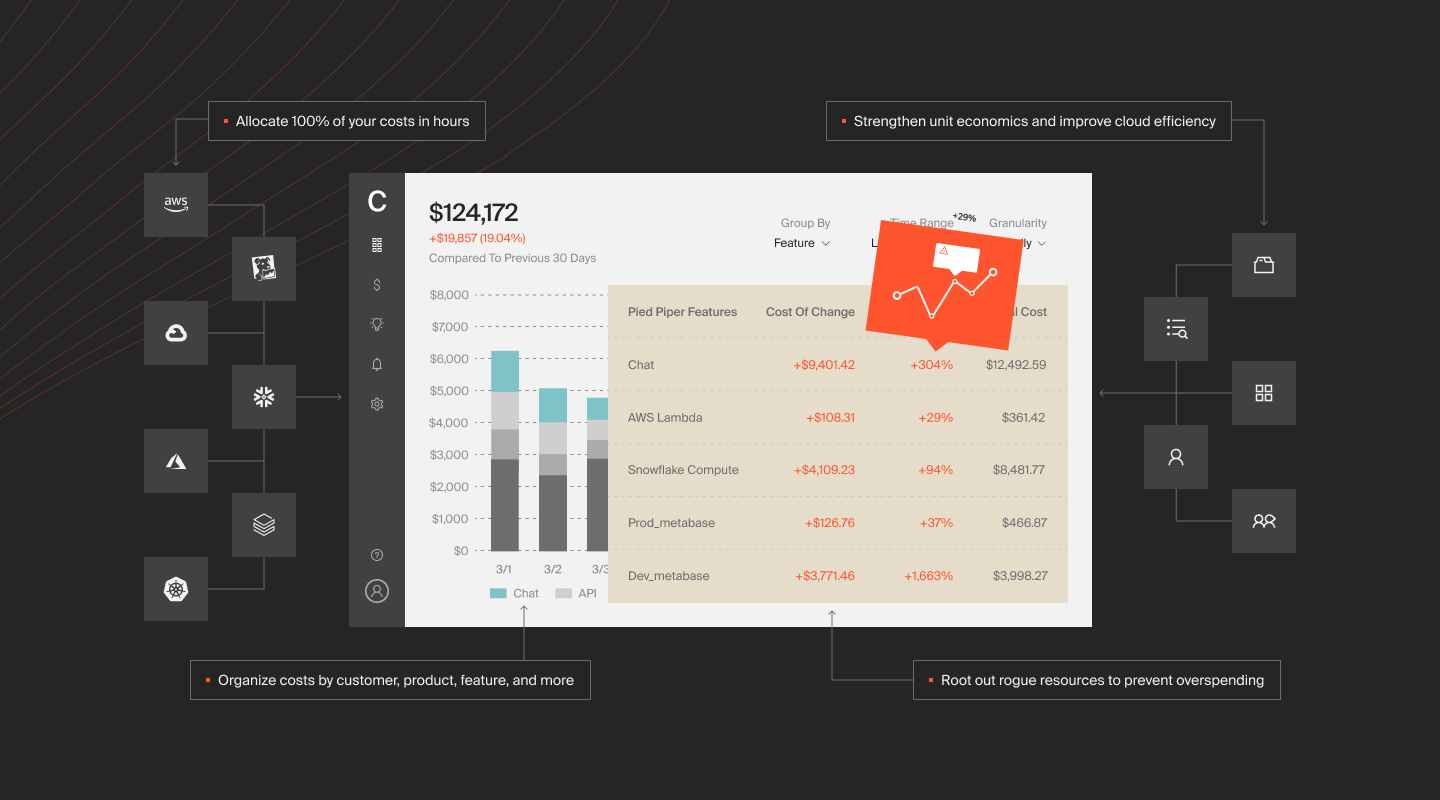
CloudZero also:
- Allocates costs even when AWS tags are missing or inconsistent
- Maps costs to business units that matter, useful for SaaS unit economics and internal chargeback
- Map Kubernetes costs alongside cloud spend with full attribution and hourly visibility
- Integrates with AI platforms to help track costs such as cost per token, request, or inference, alongside traditional infrastructure spend. See more: The AI Cost Optimization Playbook
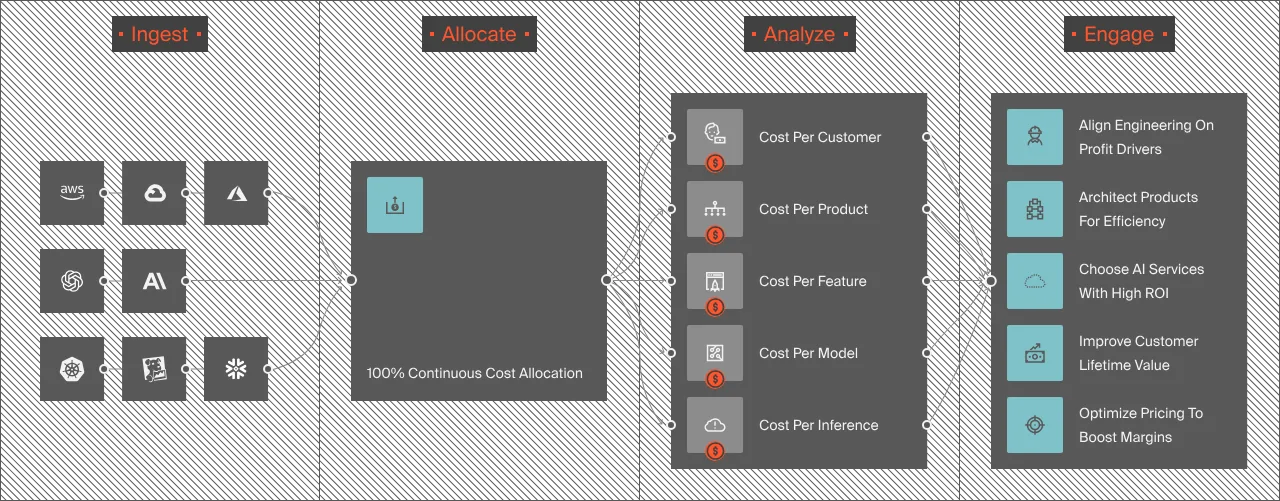
- Supports budgeting, forecasting, and variance analysis to ensure engineering and finance are aligned
Yet reading about CloudZero is one thing. Seeing it on your own data is another. Ambitious brands such as Toyota, Skyscanner, Duolingo, and more use CloudZero to understand their cloud costs and how it ties back to business outcomes. Take a free product tour or 
Frequently Asked Questions about AWS Elastic Beanstalk











